Preysight - Find Malicious Drivers on a System
EDIT: As of version 1.0, the tool has been renamed from DriverChecker to Preysight. This post has been updated to reflect the change in name, though there may be some references to the old name as well.
I’m proud to introduce Preysight, a tool that will scan all loaded drivers on a system for any that may be suspicious/malicious in nature! This blog post will supplement the GitHub repository for the tool, outlining the various modules that the tool uses to try to detect any potentially suspicious drivers. The GitHub repository can be found here.
Detection Techniques
Below is a list of the current modules that Preysight uses to try to find maliciously loaded drivers:
| Technique | Description |
|---|---|
| Nonexistent Files | Any currently loaded drivers that have no associated file that exists on the filesystem |
| File Extension | Any loaded driver that has an abnormal file extension associated with it (IE, not .sys) |
| File Path | Driver that was loaded from a non-standard file path (IE, not C:\Windows\System32\drivers) |
| Trust Verification Failed | Any drivers that do not pass the Windows trust verification system via digital signatures and authenticode |
| Expired Signing Certificate | Any drivers that were signed by an already expired signing certificate |
| LOLDrivers | Any loaded drivers that are explicitly listed on the LOLDrivers.io website |
Nonexistent Files
This module attempts to locate any loaded kernel drivers that have no associated driver file on the filesystem. The purpose of this module is to find any drivers that may have been loaded directly from memory; some malware samples will embed a driver directly into themselves, then attempt to load it at runtime without dropping the driver file to disk first. This module can contain some false positives, as Windows itself will load some “virtual” drivers on boot, mostly pertaining to creating crash dumps. More information on these virtual drivers can be found here.
File Extension
Normal driver files have a file extension of “.sys”, but malware will sometimes drop drivers to the system using randomized or masqueraded file extensions to try to hide the true purpose of the file. While this may hide that the file is a driver from anyone who looks at it in explorer, it raises a huge red flag for any drivers loaded into the kernel, as any legitimate application will use the standardized extension for drivers that Windows recognizes. Due to this, it is rather unlikely that any driver found under this category will be a false positive, making this a high fidelity detection module.
File Path
Drivers, and especially kernel drivers, should be placed in a directory that is protected with appropriate file permissions, only allowing an administrator or SYSTEM to modify the files. As such, most Windows drivers are placed in the C:\Windows\System32\drivers directory, or sometimes C:\Program Files, to make sure they cannot be tampered with. Malware, on the other hand, generally needs to drop files to the filesystem in places that are world writable, or atleast writable by a standard user. Common locations for this generally include: C:\ProgramData, C:\Users\<user>\AppData, C:\Users\Public, and so on. This module looks for any loaded drivers that were loaded from a non-standard location, potentially indicating a maliciously loaded driver.
Trust Verification Failed
Driver Signature Enforcement (DSE) has been a component since Windows Vista that requires all drivers loaded into the operating system to be digitally signed. Since Windows 10, this driver signing policy has become even more strict, also requiring a digital signature to be present on the driver from Microsoft via the Windows Hardware Developer Center. This module verifies that all loaded drivers have such a digital signature, by using the WinVerifyTrust API to check to see if the driver file has an embedded signature or one from a catalog file. According to Windows policy, any kernel mode boot-start driver (one that loads during the boot process) must have an embedded signature, whereas any kernel mode non-boot-start driver can have either an embedded or catalog-based signature. More information on this differentiation can be found here. This module is unlikely to find any such drivers loaded, as Microsoft has significantly locked down what can load into the kernel in a standard manner. That being said, it is possible to disable DSE on a system, allowing any driver to be loaded into the kernel, so this module can help discover a computer that may be in this state.
Expired Signing Certificate
Private keys for legitimate signing certificates are commonly stolen by threat actors to help make their malicious payloads look more legitimate. By signing payloads with these legitimate signing certificates, these malicious payloads can more easily bypass a number of Windows security features, even if the certificate has already expired. While drivers require a higher level of scrutiny to load into the operating system, it is still possible to do this thanks to the July 29 2015 exception. This is a policy implemented by Microsoft that allows for any non-revoked certificate that was issued or expired before the July 2015 date to sign binaries, as long as they chain to a supported cross-signed certificate authority. This ability to sign malicious payloads with old, expired signing certificates is commonly used by threat actors to get their driver loaded into modern operating systems.
LOLDrivers
The website LOLDrivers.io maintains a list of known, legitimately signed drivers that can be used to perform malicious activity on a system. Whether this is killing security services, allowing arbitrary read/write from anywhere in memory, manipulating kernel callbacks, there are many techniques that these types of drivers can allow a threat actor to perform on a system when it is loaded. These are known as Bring Your Own Vulnerable Driver (BYOVD) techniques and have become increasingly popular among threat actors, particularly for killing security products (known as EDR Killers) on an infected system. This module will reach out to LOLDrivers to obtain the most up-to-date list of vulnerable drivers and compare that list against all currently loaded drivers to determine if any many be present on the system. There may be some false positives with this module, as a number of legitimate Windows drivers that are actively used by the operating system or various applications may contain such a vulnerability that would allow a threat actor to compromise the system.
Examples
Below are some examples of this tool in action against legitimate malware samples that involved some sort of malicious driver load as part of their infection process.
EnCase Driver
Below is the output of the tool after executing an EDR killer malware sample that used a vulnerable EnCase driver to terminate processes on the system:
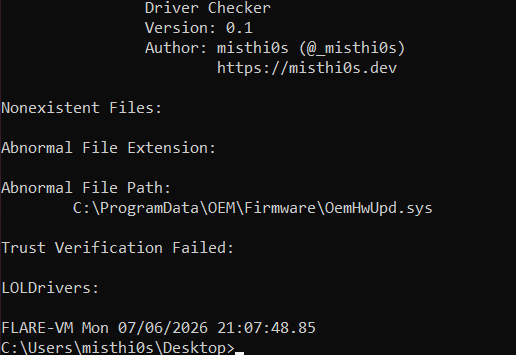
The above malware sample write-up can be found here.
GentleKiller
Below is the output of the tool after executing a sample of GentleKiller, a well-known EDR killer malware strain:
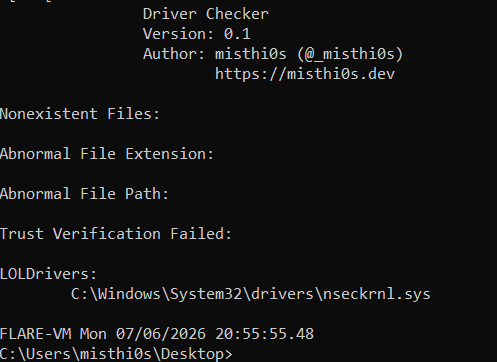
The above malware sample write-up can be found here.
Conclusion
Preysight will be continually updated to include new modules to help identify any suspicious or malicious drivers loaded on to a system. If you have any ideas for enhancements, shoot me an email or open up an issue on the GitHub repository.